This is Part 3 of an ongoing series on building Juana IA — a personal AI platform that runs entirely on my own hardware, no external APIs, no data leaving my local network. The project is still under active construction.
A few weeks ago, Juana — the self-hosted AI assistant I’m building — was taking between 15 and 24 seconds to respond to a simple “hello.” Not because of bad hardware. I have an NVIDIA RTX 5090 with 32 GB of VRAM. The problem was somewhere else entirely, and finding it took systematic work.
This article is about that investigation: the tooling I set up to diagnose the bottleneck, the decisions I ruled out before landing on the right one, and the two changes that dropped response time to around 2 seconds.
Before changing anything, I needed to know where the time was going. Juana is a microservices architecture — requests travel through a gateway, an orchestrator (Soul), a planner (Planner), a session service, a memory service, a retrieval pipeline, and finally the LLM service. Any of those hops could be the problem.
I instrumented the full stack with distributed tracing using OpenTelemetry and Tempo. Every service emits spans with timing data, and Tempo correlates them into a single trace per request. With that in place, I could see exactly what a “hello” request looked like millisecond by millisecond.
The result was unambiguous. The gateway, orchestrator, session fetch, and intent classification were all under 100ms combined. Memory retrieval added some overhead, but it was stable. The spike was entirely in llm-service — specifically in the time between sending the prompt to the generation engine and receiving the first token back.
That told me: the bottleneck is the inference engine, not the application layer.
What I was running before: llama.cpp
The original generation engine was llama.cpp — a C++ inference library that runs language models on CPU and GPU. It's an excellent piece of software for what it's designed to do: run models portably on a wide range of hardware, including consumer-grade machines with limited GPU memory.
The key word is portably. llama.cpp is optimized for single-stream efficiency and portability rather than high-throughput, multi-user serving. It runs well on almost any hardware, but it doesn’t have the GPU-specific optimizations that high-bandwidth cards benefit from most.
The more accurate framing isn’t “llama.cpp has no CUDA kernels” — it does have CUDA support. The difference is architectural: llama.cpp’s queuing model leads to high time-to-first-token and constant inter-token latency, reinforcing its suitability for offline batch processing or single-user tasks. For a conversational assistant where perceived latency matters, that model isn’t ideal.
Additionally, the inference engine was generating the full response before returning anything. No streaming. The user saw a blank screen for the entire generation time — even if the model was already producing tokens.
What I considered and ruled out
Before switching engines, I explored several other directions:
Query optimization in the retrieval pipeline. I tightened the hybrid search query (more on this below) and reduced the number of chunks being reranked. This helped the retrieval stage but moved the needle by less than 500ms on total latency — not the root cause.
Prompt size reduction. I analyzed whether the system prompt was bloated. It wasn’t significant — trimming it saved maybe 200ms.
Model quantization tuning. I was already running a quantized model. Going more aggressive on quantization degrades quality noticeably for a conversational assistant. Not worth it.
Async pipeline changes. I moved some post-turn processing (session writes, Kafka events) to fire after the response instead of before. Helped slightly. Still not the bottleneck.
The tracing data kept pointing to the same place: the time between the prompt hitting the inference engine and the first token coming back. The engine itself was the problem.
The switch: vLLM
vLLM is an inference server built at UC Berkeley, designed from the ground up for GPU throughput. Its core innovation is PagedAttention — a memory management technique for the KV cache inspired by operating system paging. Instead of allocating a fixed contiguous block of GPU memory per request (which wastes space and fragments VRAM), PagedAttention manages KV cache in pages that can be allocated, reused, and reclaimed dynamically.
The practical effect: much better VRAM utilization, higher concurrency, and significantly lower time-to-first-token on interactive workloads.
On NVIDIA GPUs, vLLM provides near-instantaneous Time to First Token and lower Inter-Token Latency at low concurrency, making it ideal for interactive applications. That’s exactly the profile of a conversational assistant: single user, interactive, latency-sensitive.
vLLM runs as a standalone server exposing an OpenAI-compatible API. My application service (llm-service) calls it over HTTP internally — POST /v1/chat/completions — exactly like calling the OpenAI API, except nothing leaves the machine. Switching from llama.cpp to vLLM meant writing a new adapter in llm-service. The rest of the architecture didn't move.
The model: Qwen3 AWQ 4-bit
For the generation model, I’m currently running Qwen3 30B A3B Instruct AWQ 4-bit — a Mixture-of-Experts architecture where only ~3B parameters are active per inference despite the model having 30B total parameters. This gives reasoning quality well above what a pure 3B model would offer, at a fraction of the VRAM cost.
I say currently deliberately. Once I move embeddings and reranker fully off the GPU (they’re already on CPU via ONNX Runtime), I’ll have more VRAM headroom and can revisit whether a larger or different model makes more sense. The model choice is still evolving.
The deployment profile I landed on after calibration:
VLLM_MAX_MODEL_LEN=8192
VLLM_GPU_MEMORY_UTILIZATION=0.65
VLLM_KV_CACHE_DTYPE=fp8
VLLM_MAX_NUM_SEQS=1
VLLM_MAX_NUM_BATCHED_TOKENS=2560
The 0.65 utilization is intentional — I'm not trying to saturate the GPU. The 35% headroom keeps space available for the intent classifier and the image generation service planned for a later release. Embeddings and reranker already run on CPU — llm-service has no CUDA visibility and uses only ~841 MiB of RAM, leaving the full GPU dedicated to generation.
The CPU performance is acceptable for this use case:
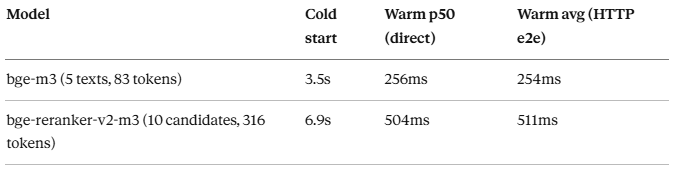
Cold start happens once at container startup. The HTTP end-to-end numbers include JWT validation, X-Caller-Service, middleware, FastAPI/Pydantic serialization, and Docker network overhead — and they came in slightly under the direct model benchmark, confirming that HTTP overhead is minimal (~20ms). Neither model sits in the critical path of token generation — their latency is additive only during the retrieval phase, before the LLM call. Running a single service at 100% GPU utilization is locally optimal but systémically no.
The observed runtime numbers:
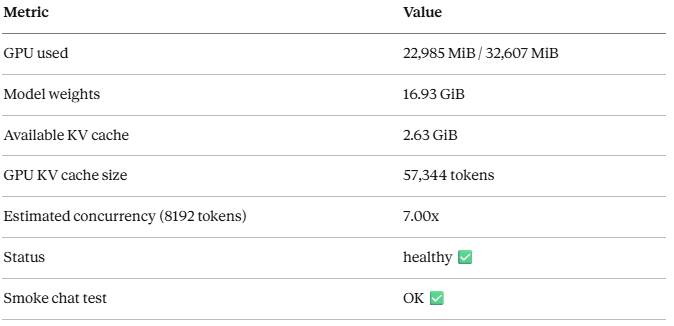
End result: 15–24 seconds → ~2 seconds. An 87–92% reduction in latency. Same hardware, same model family, different engine.
A follow-up benchmark measured actual generation throughput against the running vLLM instance (5 real generations, Qwen3 30B AWQ 4-bit):
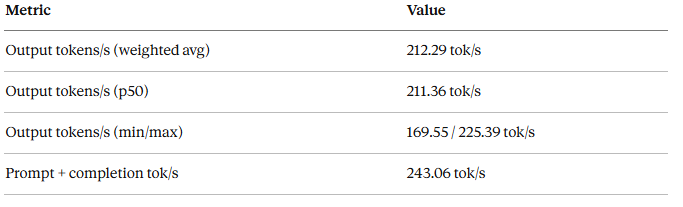
For context: the previous engine was generating at roughly 15–20 tok/s on the same hardware. That’s a 10–14x throughput improvement from switching inference engines alone.
Keeping vLLM isolated: network segmentation
One thing that doesn’t come up in most inference benchmarks is the security model. In a microservices setup, having a powerful inference engine reachable by any container in the stack is a problem.
My solution: a dedicated internal Docker network that only three services join — the inference server, the service that calls it, and the metrics collector.
# names changed — not the real network names
networks:
  main-network:     # all application services
  inference-net:    # inference server + llm-service + prometheus only
    internal: true  # no external routing

inference-server:
  networks:
    - inference-net  # not visible to soul, gateway, or any app service

llm-service:
  networks:
    - main-network
    - inference-net  # only authorized caller

prometheus:
  networks:
    - main-network
    - inference-net  # metrics scraping only — no API key
Soul, the gateway, and every other application service cannot resolve the inference server’s hostname. The network makes the reachability problem disappear at the infrastructure level. The API key is a second barrier. mTLS comes in a later phase.
One nuance worth calling out: Prometheus has TCP access to the inference server’s port within the inference network. What blocks it from making generation calls is that it doesn’t hold the API key, and the inference server enforces Authorization: Bearer on all /v1/* endpoints. Network isolation + API key enforcement together — neither alone is sufficient.
The second change: hybrid search
Parallel to the engine migration, I migrated the database image from pgvector/pgvector:pg16 to paradedb/paradedb:pg16.
ParadeDB is PostgreSQL — not “similar to” PostgreSQL, but literally PostgreSQL with pg_search pre-installed. Same SQL, same drivers, same connection strings. The only change was the image in docker-compose.
pg_search adds BM25 full-text search on top of the vector search that pgvector already provided. This enables hybrid search with Reciprocal Rank Fusion (RRF): run both a semantic vector search and a BM25 keyword search on the same query, then combine the rankings.
The practical difference: vector search is good at capturing meaning and synonymy. BM25 is good at finding exact terms — technical names, model identifiers, version numbers, dates. RRF combines both signals. If you ask Juana about “Qwen3 AWQ benchmarks” and the embedding doesn’t capture the exact term, BM25 finds it anyway. If you ask something conceptual where the exact words don’t appear in the stored text, vector search fills the gap.
Zero schema migration, zero new infrastructure. One image change.
Pipeline latency — pre-streaming baseline
Before implementing streaming, I measured the full pipeline end-to-end: gateway → soul → planner → memory/session → llm-service → vLLM. 5 warm requests, short prompt.
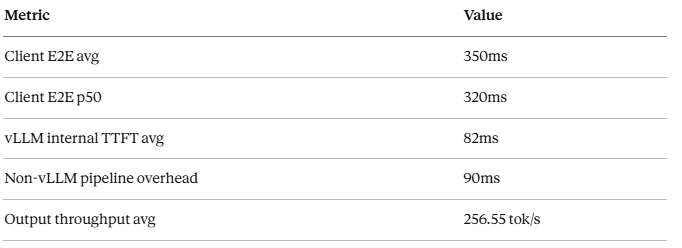
One important clarification: without streaming active, time_starttransfer from curl equals total response time — the client receives the first byte only when the full response is ready. This is buffered TTFB, not real TTFT.
What these numbers tell us is that the non-vLLM pipeline overhead is only ~90ms. The vLLM internal TTFT is ~82ms. So the projected real client TTFT once streaming is active:
Non-vLLM overhead: ~90ms
vLLM TTFT:         ~82ms
──────────────────────────
Projected TTFT:    ~172ms
Realistic range:   150–250ms
The actual number gets measured when POST /api/v1/chat/stream propagates end-to-end from gateway to the first SSE chunk at the client.
What’s coming next
The ~2 second response time is still full-response latency — Juana generates the complete answer before showing anything. The next phase implements streaming end-to-end: vLLM supports stream=true natively, and the soul-service will proxy the SSE stream directly to the client. The expected time-to-first-token drops to ~300–500ms. The conversation starts to feel like a real exchange rather than a request-response cycle.
After that: token-aware context budgeting — a PromptBudgetBuilder that counts exact token costs per section of the prompt before assembly, with intelligent trimming when context is tight. And prefix caching: the static part of the system prompt (instructions, context, skill definitions) gets cached in VRAM and reused across requests. Expected 20–40% reduction in time-to-first-token for conversational turns.
There’s a second article coming once those numbers are in.
What I took away from this
Measure before you optimize. I could have spent weeks tuning prompt sizes, database indexes, and async pipelines. The tracing data told me in an afternoon that none of that mattered as much as the inference engine.
The inference engine is not a commodity. The choice of engine — llama.cpp, vLLM, TensorRT-LLM, Ollama — has a larger impact on observed latency than most hardware upgrades. The design philosophies are genuinely different: vLLM is designed for high-throughput, multi-user serving, while llama.cpp is optimized for single-stream efficiency and portability. Neither is wrong — they’re built for different jobs.
Headroom is architecture. The 35% free VRAM isn’t waste. It’s what allows the image generation service, the embedding model, and the reranker to coexist without killing each other. Designing for headroom from the start is cheaper than redesigning after you’ve hit the ceiling.
PostgreSQL is more capable than most people use it for. BM25 full-text search and vector search in the same query, in the same database, with no extra infrastructure. That’s not a compromise — for this scale, it’s the right tool.
Hardware and stack
- GPU: NVIDIA RTX 5090, 32 GB VRAM GDDR7
- CPU: AMD Ryzen 9 5900XT
- RAM: 128 GB DDR4
- OS: Windows 11 + WSL2 + Docker
- Generation model: Qwen3 30B A3B Instruct AWQ 4-bit (current candidate — may change as VRAM is freed)
- Inference engine: vLLM (OpenAI-compatible server)
- Embeddings: BAAI/bge-m3 (CPU)
- Reranker: bge-reranker-v2-m3 (CPU)
- Intent classifier: Qwen2.5–1.5B (GPU)
- Database: ParadeDB pg16 (PostgreSQL + pgvector + pg_search)
- Backend: Python/FastAPI + Java/Spring Boot
- Tracing: OpenTelemetry + Tempo
- Orchestration: Docker Compose
I’m open to remote opportunities in Senior Software Engineer,
AI Infrastructure Engineer, or Backend Architecture roles.
This is Part 3 of an ongoing series on building Juana IA v2 — a self-hosted personal AI platform still under construction. Part 1: I’m Building a Personal AI That Lives on My PC Part 2: I Gave My Local AI a Brain: How I Designed the Orchestration Layer